
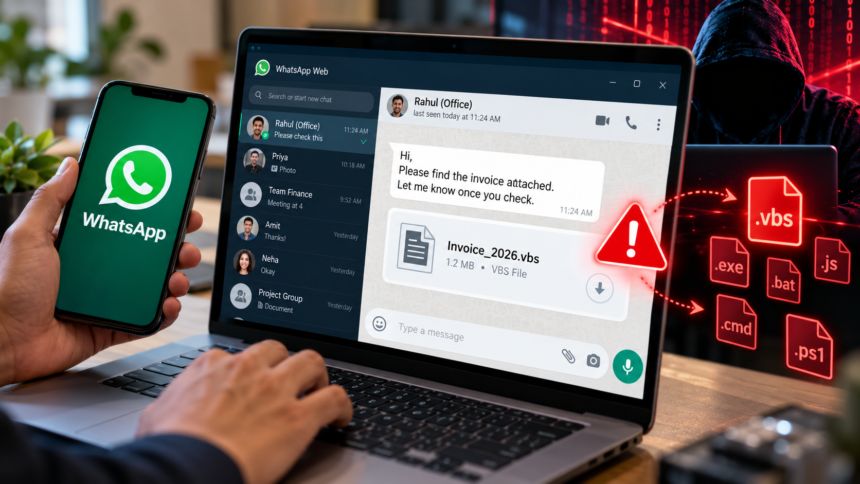
Receiving a suspicious message does not necessarily mean your own WhatsApp account has been hacked. You may simply be receiving a malicious attachment from another compromised account. Similarly, a phone running slowly, overheating or losing battery quickly is not enough on its own to establish that WhatsApp has been compromised.
Manish Mohta, Managing Director of software development and cybersecurity firm Learning Spiral, recommends checking the account’s linked devices and watching for unusual activity. Warning signs may include unfamiliar devices, messages you did not send, unexpected security notifications, sudden logouts and changes to account settings or two-step verification.
WhatsApp may also send a registration or verification notification when someone attempts to register your phone number on another device. An unexpected code or alert should be treated cautiously.
Check WhatsApp Linked Devices
WhatsApp includes a feature that lets users review the computers and browsers connected to their accounts. Open the app, go to Linked Devices, and check the list of active sessions. Log out any device or session you do not recognise.
This check is especially important if you regularly use WhatsApp Web on an office computer or shared device. If contacts report receiving unusual messages or files from your number, investigate the activity and secure your account instead of simply deleting the conversation.
How to Recover a Compromised WhatsApp Account
If someone has taken control of your account, re-registering your phone number can help you regain access. WhatsApp instructs users to enter the six-digit registration code received through SMS or a phone call. After successful registration, other devices connected to that account are automatically logged out.
Never share this code with anyone, including someone claiming to represent WhatsApp, a bank, the police or another trusted organisation.
If an attacker has enabled two-step verification and you do not know the PIN, WhatsApp says you may need to wait seven days to reset it after re-registering your number.
Once access is restored, review linked devices, enable two-step verification and keep the official WhatsApp application updated. These measures can help strengthen account security.
Mohta also cautioned that a WhatsApp account takeover is different from a complete compromise of a mobile phone. Attackers may gain account access through fraudulent device-linking requests or stolen verification codes, while malicious attachments can infect a computer. Keeping software updated and avoiding suspicious downloads can reduce these risks.
Check the File Extension Before Opening Attachments
CERT-In advises users to exercise caution with executable file types, including .vbs, .vbe, .exe, .bat, .cmd, .js and .ps1. Such files can execute commands and may be used to install malware.
For example, an attachment described as an invoice should raise concerns if its actual file type is an executable script rather than an ordinary document. Do not open a file simply because its name appears familiar.
Even when an attachment looks like a standard financial document, verify unexpected files directly with the sender before opening them.
Anuj Magazine noted that cyberattacks can involve malicious scripts, harmful Android application packages (APKs), phishing websites and fraudulent WhatsApp device-pairing QR codes. More sophisticated zero-click attacks can potentially exploit software vulnerabilities without requiring a user to click anything. Such attacks have historically been associated with targeted spyware campaigns rather than ordinary mass-market scams.
Keeping WhatsApp and the device’s operating system updated is therefore an important security precaution.
What to Do If a Contact Sends an Unexpected File
If a friend or colleague sends an unusual attachment, confirm that they actually sent it before opening it. Call them or contact them through another channel, particularly if the message creates urgency or asks you to review a financial document immediately.
Users should also keep their browsers and operating systems updated, use reputable security software and avoid installing applications shared through messaging platforms without verifying their source. Passwords, banking credentials, one-time passwords (OTPs) and WhatsApp verification codes should never be shared through chat.
The key lesson from this campaign is that a familiar contact is not always a reliable guarantee of safety. When a WhatsApp account has been compromised, attackers can use the trust attached to that account to spread malicious files. Verifying unexpected attachments and checking account security can help reduce the risk.
Disclaimer: This article is intended for general information and cybersecurity awareness. The information describes reported malware activity and recommended precautions, but it does not guarantee protection against every type of cyberattack. Users should consult official WhatsApp and CERT-In guidance for current security instructions and seek assistance from a qualified cybersecurity professional if they suspect a device or account has been compromised.