
The Employees’ Provident Fund (EPF) is one of India’s most important retirement savings schemes for salaried employees. Through regular contributions from both employees and employers, the scheme helps workers build a financial corpus for the future.
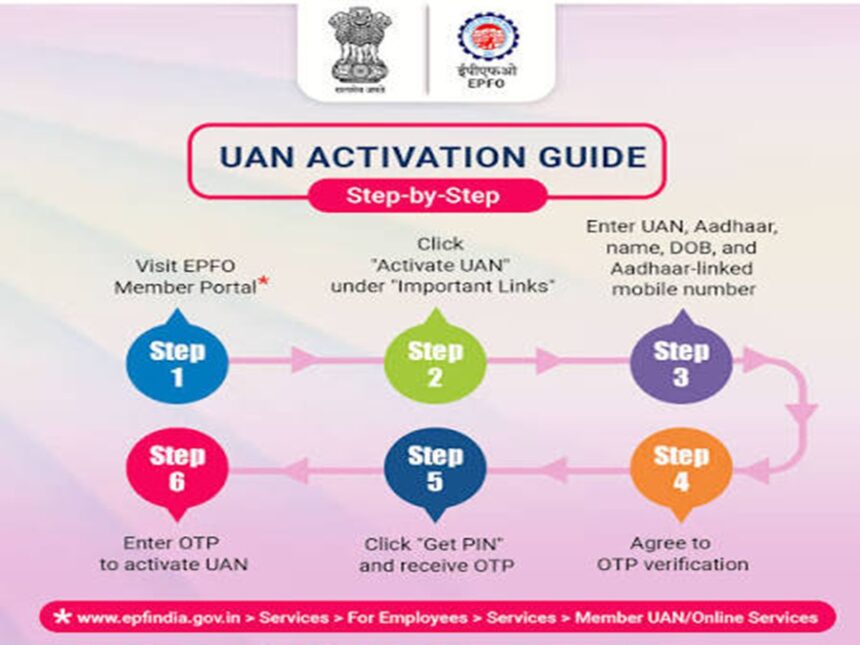
A major update has now changed how EPF members activate or generate their Universal Account Number (UAN). The Employees’ Provident Fund Organisation (EPFO) has moved these services from its website to the government’s UMANG app, where Aadhaar-based Face Authentication is now required.
Here is everything you need to know about the new UAN activation process, generating a fresh UAN and recovering a forgotten UAN.
EPF Interest Rate for FY26
For the financial year 2025-26, the government approved an 8.25% interest rate on EPF deposits, based on the recommendation of the EPFO.
The same interest rate is applicable to contributions made through the Voluntary Provident Fund (VPF). According to PTI, the interest crediting process was completed on July 15.
This marked the third consecutive year in which EPF subscribers received an interest rate of 8.25%.
Employees with a basic salary and dearness allowance of up to ₹15,000 fall under mandatory EPF coverage. Those earning above this limit may choose to make additional voluntary contributions through the VPF, subject to applicable rules.
UAN Activation Process Has Moved to UMANG
EPFO has introduced a new process for activating an existing UAN and generating a new one. Members must now use the UMANG mobile application, with Aadhaar-based Face Authentication Technology (FAT) forming an important part of the verification process.
The change follows a major database consolidation and software upgrade by the retirement fund body, aimed at improving the reliability, speed and overall efficiency of its digital services.
How to Activate Your UAN Through the UMANG App
Follow these steps to activate an existing UAN:
Step 1: Download and Register on UMANG
Download the UMANG app from the Google Play Store or Apple App Store.
If you are a new user, register using your Aadhaar-linked mobile number and create a four-digit M-PIN.
Step 2: Search for EPFO Services
After logging in to the app, search for “EPFO”.
Open the option called “UAN Services Through Face Auth” and select “UAN Activation”.
Step 3: Enter Your Details
Enter the following information:
- Your UAN
- Aadhaar number
- Mobile number linked to Aadhaar
You will then receive an OTP on your registered mobile number. Enter the OTP to continue.
Step 4: Complete Aadhaar Face Authentication
The app may ask you to install the Aadhaar Face RD app if it is not already available on your phone.
Once the app is installed, you will be taken to the facial authentication screen. Follow the instructions and allow the application to scan your face.
The verification is completed successfully when the app captures your face and displays a green confirmation circle.
Step 5: Verify Your Personal Information
After face authentication, carefully check the details displayed on the screen, including your name and date of birth.
If everything is correct, submit the request.
Once the UAN activation process is successfully completed, EPFO will send a temporary password to your registered mobile number through SMS.
How to Check Whether Your UAN Has Been Activated
You can verify the activation status through the UMANG app.
Go back to “UAN Services Through Face Auth” and select “UAN Allotment and Activation”.
Enter your UAN, Aadhaar number and Aadhaar-linked mobile number. After providing the required consent, request an OTP and complete the verification.
If your UAN has already been activated, the system will display a message stating that the entered UAN is already active.
How to Generate a New UAN
Employees who do not have a UAN can also use the available UAN services to generate one.
The process begins by entering the mobile number linked to Aadhaar and completing OTP verification.
After verification, users can select one of the available identification options:
- Member ID
- PAN card
- Aadhaar card
Enter the required details along with the captcha code and submit the application.
You will need to complete another OTP verification to finish the process. Once your details are successfully verified, the newly generated UAN will be sent to your registered mobile number through SMS.
Forgot Your UAN? Here’s How to Recover It
If you have forgotten your UAN, EPFO provides options to retrieve it through the official member portal as well as the UMANG app.
Retrieve UAN Through the EPFO Member Portal
Visit the EPFO member portal and select the “Know Your UAN” option.
Enter your registered mobile number and choose an identification document. You can use:
- Aadhaar
- PAN
- Member ID
Enter the requested information along with the captcha code and proceed with OTP verification.
Once your details are verified, the system will retrieve your UAN. A successful request will display a confirmation message indicating that your UAN has been retrieved.
How to Find Your UAN on the UMANG App
You can also recover a forgotten UAN directly through UMANG.
Open the app and search for “EPFO”. Then go to Employee Centric Services and select “Know Your UAN”.
Enter your registered mobile number and captcha code before completing OTP verification.
Next, choose one of the available search options:
- Aadhaar
- PAN
- Member ID
Make sure the name and date of birth entered match your Aadhaar records. Once the details are verified, select “Show My UAN”.
Your UAN will be displayed on the screen and will also be sent to your registered mobile number through SMS.
What If More Than One UAN Is Displayed?
If the system shows multiple UANs linked to your details, it may indicate that duplicate UANs have been created.
EPFO rules do not allow a member to maintain multiple active UANs. Employees who find more than one UAN should take the necessary steps to get the issue corrected through the appropriate EPFO process.
Key Takeaway
With EPFO shifting UAN activation and generation to the UMANG app, Aadhaar-based face authentication has become a key part of the updated process. Whether you want to activate an existing UAN, generate a new one or recover a forgotten number, UMANG now offers a centralised way to access these services.
Before starting the process, make sure your Aadhaar-linked mobile number is active and your personal details are correctly updated. This can help ensure a smoother OTP and face authentication process.