
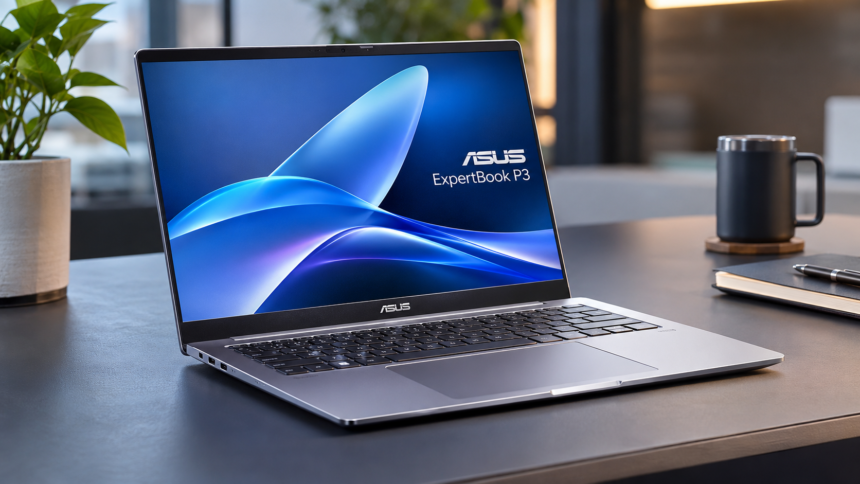
New Delhi: Choosing a reliable laptop for professional work is not always easy, particularly when performance, portability and productivity all matter. The ASUS ExpertBook P3 is designed for business users who need a dependable machine for everyday office tasks, multitasking and occasional creative workloads.
After spending a couple of weeks using the ASUS ExpertBook P3, including office work and some video editing, the experience offered an interesting opportunity to revisit Windows laptops after more than four years of primarily using a MacBook.
Moving from macOS to Windows required some adjustment, particularly when getting familiar with the keyboard layout and interface. However, the ExpertBook P3 quickly felt comfortable to use. Its combination of a lightweight design, sturdy construction and business-focused features makes it an interesting option in the professional laptop segment.
The 14-inch version was used for this review. Here is a closer look at its design, specifications, performance, display, battery life and overall experience.
ASUS ExpertBook P3: Specifications at a Glance
The ASUS ExpertBook P3 is available in 14-inch and 16-inch configurations, with Intel Core Ultra processors and a range of productivity-focused hardware.
| Specification | Details |
|---|---|
| Processor | Up to Intel Core Ultra 7 255H |
| Graphics | Integrated Intel Arc Graphics |
| RAM | Up to 64GB DDR5-5600 |
| RAM Slots | Dual SO-DIMM |
| Storage | Dual M.2 PCIe 4.0 SSD slots |
| Maximum Storage | Up to 6TB |
| Display | 16:10 WUXGA IPS |
| Resolution | 1920 × 1200 pixels |
| Operating System | Windows 11 |
| Wireless Connectivity | Up to Wi-Fi 7 |
| Bluetooth | 5.4 |
| Battery | 70Wh |
| Charging | 65W USB Type-C |
| Speakers | 2W × 2 stereo |
| AI Performance | Up to 96 TOPS |
| NPU Performance | Up to 13 TOPS |
| Weight | From 1.49kg / 1.80kg |
| Hinge | 180-degree lay-flat |
| Security | Fingerprint sensor, TPM 2.0 and webcam privacy shield |
Design, Build Quality, Display and Keyboard
Design and build quality
The ASUS ExpertBook P3 comes in two sizes, 14-inch and 16-inch. The smaller variant weighs approximately 1.49kg, while the larger version starts at 1.80kg.
The 14-inch model used during the review feels surprisingly light without compromising on its overall construction. ASUS has used ABS and polycarbonate materials for the A, C and D chassis components, supported by internal metal reinforcements for additional structural strength.
In everyday use, the laptop feels sturdy and is comfortable to carry around. Its weight is comparable to the MacBook Air used regularly, which makes it convenient for professionals who frequently travel between offices and meetings.
Another useful addition is the 180-degree lay-flat hinge. It allows the screen to open completely flat, making it easier to share content during presentations and collaborative discussions. ASUS claims that the hinge has been tested for up to 50,000 opening and closing cycles.
Keyboard and touchpad
The keyboard is one of the more enjoyable aspects of the ExpertBook P3. The keys offer a comfortable typing experience, with a 1.5mm key travel distance, 19.05mm key pitch and a 0.2mm key dish designed around the natural shape of the fingers.
The key lettering is subtle and suits the laptop’s professional appearance. However, coming from a MacBook, the absence of a keyboard backlight was noticeable.
The Caps Lock indicator could also have been brighter. The dedicated Copilot key was another addition that did not feel particularly necessary during everyday usage.
The fingerprint sensor and face recognition were occasionally less accurate during testing. A single-press power button would also have been preferable.
The touchpad is spacious and generally smooth to operate. It supports controls for volume, brightness, media playback and ASUS ScreenXpert. However, there were occasional instances when it registered unintended actions, particularly while selecting text.
Overall, the keyboard and touchpad provide a comfortable working experience, although there is room for improvement.
Display quality
The ExpertBook P3 features a 16:10 WUXGA IPS display with a resolution of 1920 × 1200 pixels. Its anti-glare coating helps reduce reflections, making it suitable for extended office sessions.
During testing, the screen remained comfortable to work with, and basic photo and video editing tasks were relatively easy to handle.
The display offers a 60Hz refresh rate, 300 nits of brightness and 45% NTSC colour coverage. ASUS lists the screen-to-body ratio at 88% for the 14-inch version and 90% for the 16-inch model.
An optional wide-view display configuration is also available, offering viewing angles of up to 178 degrees.
The panel is suitable for everyday productivity, documentation, browsing and general editing. However, users who require highly accurate colours for professional creative work may want a display with wider colour coverage.
Performance, Connectivity and Cooling
Processor and hardware
The ASUS ExpertBook P3 is available with Intel Core Ultra processors, including configurations featuring the Core Ultra 7 225H and Core Ultra 7 255H.
The Core Ultra 7 225H configuration offers up to 83 TOPS of combined AI processing performance, while the Core Ultra 7 255H version is rated at up to 96 TOPS.
The integrated NPU delivers up to 13 TOPS, while Intel Arc 140T integrated graphics are listed with up to 74 TOPS of GPU performance.
Memory support extends up to 64GB DDR5-5600 through dual SO-DIMM slots. Certain configurations also mention upgrade support of up to 96GB, depending on the supported memory configuration.
Storage is another strong point. The laptop features two M.2 PCIe 4.0 NVMe SSD slots supporting 2280 and 2230 formats. ASUS lists combined storage support of up to 6TB.
The available configurations include options such as 512GB + 512GB storage or a single 2TB SSD. The upgrade guide also mentions support for configurations of up to 4TB + 2TB, depending on the model.
Wireless connectivity includes Wi-Fi 7 and Bluetooth 5.4. Models featuring an all-plastic chassis specify Wi-Fi 6 instead.
The processor can operate at up to 35W in Performance mode, depending on the configuration and operating conditions.
Ports and connectivity
For a business-oriented laptop, the ExpertBook P3 offers a comprehensive selection of physical connections.
Available ports include:
- Two USB Type-C ports with Power Delivery, DisplayPort and data transfer support.
- Two USB 3.2 Gen 1 Type-A ports.
- HDMI 2.1 TMDS.
- RJ45 Ethernet with BC1.2 support.
- 3.5mm combination audio jack.
- Kensington Nano Security Lock slot.
The laptop can also connect to up to three external 4K displays through its USB-C and HDMI 2.1 connectivity.
This selection makes the ExpertBook P3 suitable for office environments where external monitors, wired networking and multiple accessories are regularly required.
Speakers, webcam and microphones
The laptop features two 2W stereo speakers, delivering a combined audio output of 4W. For a business laptop, the audio experience is quite good.
ASUS has also included AI-based audio technologies designed to improve communication during online meetings.
Voice Focus helps reduce background sounds such as traffic, sirens and distant music while keeping human speech clearer. AI de-reverberation and acoustic echo cancellation are also included to minimise unwanted echoes during calls.
The dual-array microphones support two-way AI noise cancellation. Voiceprint Noise Reduction can identify and isolate a registered user’s voice after approximately 15 seconds of voice enrolment.
Additional meeting features include multiple-presenter modes that prioritise the main speaker and reduce background conversations.
The AI camera software includes lighting optimisation, motion tracking, appearance filters, gaze correction and background blurring. A physical webcam privacy shutter is also provided.
The webcam experience, however, remains fairly ordinary. While the additional software features are useful, the camera itself is not a major highlight.
Cooling system
ASUS uses its ExpertCool thermal technology to manage temperatures inside the ExpertBook P3.
The cooling arrangement includes rear ventilation designed to prevent hot air from flowing back into the chassis. An air-intake mesh is also included to reduce dust accumulation and support long-term thermal performance.
According to ASUS, the laptop supports a sustained TDP of 28W in Standard mode and up to 35W in Performance mode, whether the lid is open or closed.
The company lists noise levels of 24.33dB at idle and 35.07dB under 100% CPU load.
During our testing, the keyboard’s upper section and the area beneath the display remained reasonably comfortable, even during demanding workloads. The bottom panel became slightly warm during extended usage, but it was not particularly concerning.
Software, Benchmark Results and Battery Life
Software experience
The software package focuses primarily on professional productivity rather than entertainment-oriented features.
ASUS MyExpert and AI ExpertMeet bring together several tools for business users, including AI-powered meeting transcription, summaries, translation and noise cancellation.
These features can be particularly useful for professionals who regularly participate in online meetings and manage multiple applications throughout the day.
MyASUS provides access to system diagnostics, settings, updates and customer support. ScreenXpert helps users organise multiple windows and improve multitasking.
Security is handled through ASUS ExpertGuardian, which offers protection across hardware, firmware and software. Its features include BIOS recovery, firmware tamper detection and downgrade protection.
ASUS also promises five years of BIOS and driver security updates following the product announcement.
Benchmark performance
The tested ASUS ExpertBook P3 configuration, identified as P3406CCAP, delivered the following benchmark results:
| Benchmark | Score |
|---|---|
| Geekbench Single-Core | 778 |
| Geekbench Multi-Core | 4,865 |
| Geekbench OpenCL GPU | 11,482 |
| Superposition 1080p Medium | 3,103 |
| Minimum FPS | 18.11 |
| Maximum FPS | 29.73 |
| Average FPS | 23.21 |
In everyday usage, the laptop handled office applications, large spreadsheets, multiple browser tabs and multitasking without major difficulties.
It also performed well during our editing work using different software applications. Switching between windows and running several tasks simultaneously felt smooth.
However, users planning extensive 3D rendering or demanding video production workloads may benefit more from a workstation equipped with a dedicated graphics card.
For typical corporate workloads and moderate creative tasks, the ExpertBook P3 offers a capable performance package.
Battery life and charging
Battery performance was satisfactory during regular office usage. The laptop comes with a 70Wh battery and supports 65W USB Type-C charging.
ASUS claims up to 21.13 hours of video playback under its specified testing conditions. The company also states that fast charging can bring the battery to 65% in approximately 49 minutes.
In our experience, the battery performed reasonably well, although it did not quite match the endurance of the MacBook used regularly for comparison.
The faster charging support is a useful advantage, particularly for professionals who need to recharge between meetings or during short breaks.
ASUS ExpertBook P3 Review: Final Verdict
The ASUS ExpertBook P3 makes a strong impression as a business-focused laptop. Its lightweight construction, comfortable keyboard, extensive connectivity options and Intel Core Ultra processor options make it suitable for professionals who need a dependable machine for everyday work.
The 14-inch version is particularly convenient for people who travel frequently or carry their laptops between different workplaces.
There are a few areas that could be improved, including the absence of a keyboard backlight, occasional touchpad issues and an average webcam experience. Battery endurance could also be better.
Coming back to Windows after several years of using a MacBook was an interesting experience, and the ExpertBook P3 made that transition relatively comfortable.
While I would not replace my MacBook immediately, that preference is more about personal familiarity than any major weakness in the ASUS laptop.
Overall, the ExpertBook P3 deserves attention from business users looking for a lightweight, well-equipped Windows laptop capable of handling demanding office work and moderate creative tasks.
Disclaimer
This review is based on hands-on usage of the 14-inch ASUS ExpertBook P3 provided for testing over a limited period. Benchmark scores and performance observations reflect the tested configuration and may differ across variants. Specifications, upgrade options, battery life and software features may vary by model and region. The information is provided for general guidance and should not be considered a guarantee of identical performance under all usage conditions.