
New Delhi: Pensioners are required to submit a Life Certificate every year to ensure that their pension payments continue without interruption. With the availability of digital services, this process has become easier, as eligible pensioners can now generate their Digital Life Certificate from home without visiting a bank or government office.
One of the available methods is Aadhaar-based face authentication, which allows pensioners to verify their identity using a smartphone camera. However, completing the process successfully requires following certain instructions.
The Unique Identification Authority of India (UIDAI) has issued a checklist explaining the important precautions users should follow while completing Aadhaar face authentication. Here is what pensioners need to know.
What Is the Aadhaar Face Authentication Checklist?
Aadhaar face authentication uses a smartphone camera to capture and verify a person’s facial features against their Aadhaar records.
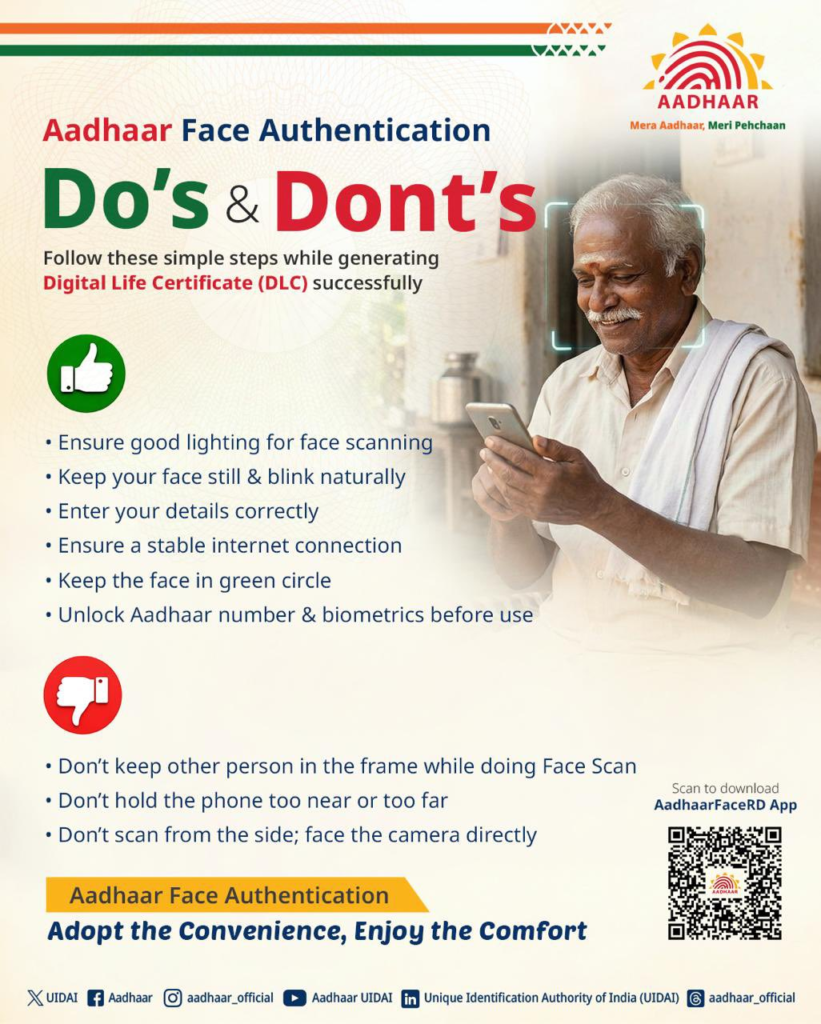
To make the verification process successful, users should follow these important instructions:
Things You Should Do
- Choose a well-lit location so that your face is clearly visible.
- Keep your face steady while the camera scans it.
- Blink naturally during the authentication process.
- Enter your Aadhaar and other personal details correctly.
- Make sure you have a stable, high-speed internet connection.
- Position your face properly inside the green circle displayed on the screen.
- Ensure that your Aadhaar number and biometric authentication settings are ready for verification.
Following these instructions can help prevent scanning errors and interruptions during the process.
Things to Avoid During Face Authentication
Apart from following the recommended steps, pensioners should also avoid common mistakes that can lead to authentication failure.
Do not allow another person to appear in the camera frame while your face is being scanned. Keep the smartphone at a suitable distance so that your entire face fits inside the green circle.
Avoid tilting the phone or capturing your face from an unusual angle. The camera should remain straight and directly in front of your face for accurate verification.
Taking care of these small details can make the Aadhaar face authentication process easier.
Apps and Platforms to Generate a Digital Life Certificate
Pensioners can use different digital platforms and authorised service centres to generate their Life Certificate.
The available options include:
- Jeevan Pramaan application.
- AadhaarFace authentication application.
- India Post Payments Bank (IPPB).
- Common Service Centres (CSC).
- Bank branches.
- Other authorised registration centres.
These facilities are particularly helpful for senior citizens who may find it difficult to travel to pension offices or banks for annual verification.
Beware of Fake Links While Generating a Life Certificate
Pensioners and their family members should remain alert while using online services for Digital Life Certificate generation.
Fraudsters may send fake messages or suspicious links claiming to provide assistance with Aadhaar verification or Life Certificate registration. Clicking on such links could put personal and financial information at risk.
Always use official applications and authorised websites for authentication. Never share sensitive Aadhaar information, OTPs or banking details with unknown individuals.
Following the correct face authentication procedure and using trusted platforms can help pensioners complete their annual Life Certificate submission safely and conveniently from home.
Disclaimer: This article is intended for general informational purposes only. Aadhaar face authentication procedures, application requirements and Digital Life Certificate services may change according to official guidelines. Pensioners should follow the latest instructions issued by UIDAI and the Jeevan Pramaan authorities and use only official applications or authorised service centres.