
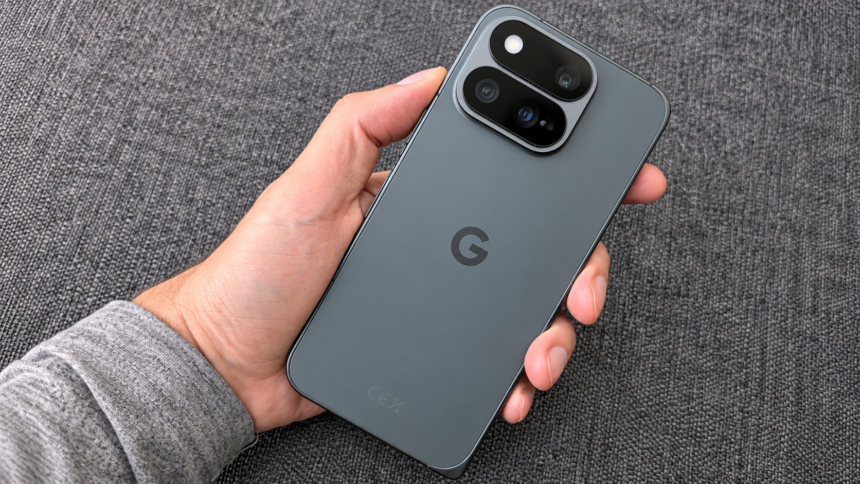
Google has quietly expanded the capabilities of its HiLight notification feature on the Pixel 11 Pro series. With the latest November Pixel Drop, the company’s RGB LED notification system now supports WhatsApp message alerts, making the feature more useful for everyday notifications.
The HiLight feature debuted with the Pixel 11 Pro lineup. It introduced a dedicated RGB LED light integrated into the rear camera module, replacing the thermometer sensor that had been included in Google’s Pro models since the Pixel 8 Pro. However, limited app compatibility initially reduced its usefulness, drawing criticism in reviews.
November Pixel Drop Adds WhatsApp Message Alerts
Google rolled out its November Pixel Drop on 10 November, introducing several new features and improvements for Pixel smartphones.
One of the updates extended HiLight compatibility to Google Messages on the Pixel 11 Pro series. However, the update also appears to have introduced another addition that was not specifically mentioned in Google’s official changelog.
HiLight can now display notifications for incoming WhatsApp messages. Previously, WhatsApp compatibility was limited to incoming call alerts. With support for both WhatsApp messages and Google Messages, users can now benefit from more notification options through the rear LED system.
How Google’s HiLight Notification System Works
Unlike the traditional single-colour notification LEDs found on older Android smartphones, Google’s HiLight uses an array of RGB LEDs. This setup produces a soft, multicoloured glow that can display different colours depending on the supported application and notification settings.
Users can customise the colours associated with supported alerts, making it easier to distinguish between different types of notifications without checking the phone’s display.
HiLight Also Supports Gemini Activity
Google initially designed HiLight to provide visual alerts for incoming calls from selected contacts. Users could assign different colours to specific contacts to identify callers more easily.
The feature also works with Gemini on the Pixel 11 Pro series. When the smartphone is placed face down and Gemini is activated, HiLight illuminates to indicate that the AI assistant is active and listening.
Third-Party App Expands HiLight Customisation
Beyond Google’s built-in features, a third-party developer has introduced an application called HiLight Studio to explore additional customisation options.
The application allows users to create personalised lighting patterns and visual effects, extending HiLight’s functionality beyond standard notifications.
However, HiLight Studio is not available on the Google Play Store. Setting it up requires shell-level access to Google’s Pixel lights service through command-line tools, with Shizuku or ADB needed for configuration.
With the addition of WhatsApp message notifications and Google Messages compatibility, Google’s HiLight feature is gradually becoming more practical for Pixel 11 Pro users.